There are two separate language settings in SkaleMe: the interface language (the language the app and docs display in) and the outreach message language (the language the AI writes your prospect messages in). These are independent — you can run a campaign in Vietnamese even if your app is set to English. This article is about the outreach message language and how SkaleMe chooses it.
How does SkaleMe choose the message language?
SkaleMe follows a two-step priority order every time it writes a message:
| Priority | Mechanism | How to activate |
|---|---|---|
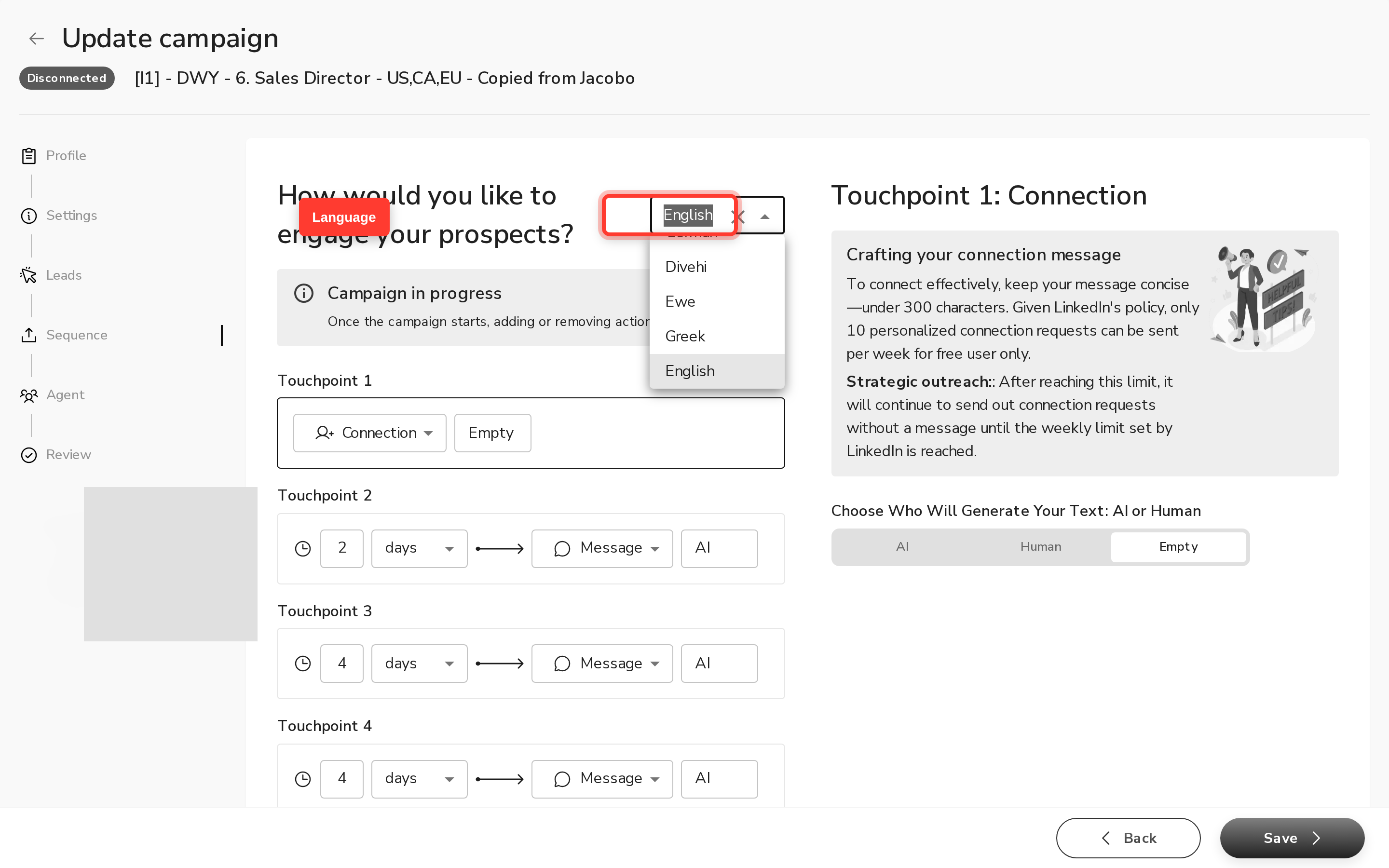
| 1 | Campaign language setting | Select a specific language in Campaign → Sequence → Language dropdown |
| 2 | Auto-detect | Leave the language field empty — the AI detects the prospect's language from their LinkedIn profile and context |
When you pick a specific language in the campaign settings, every message in that campaign uses it. When you leave the field empty, the dropdown shows Auto-detect and SkaleMe reads the prospect's LinkedIn profile to decide the language for each message individually.
Where to find the setting: open your campaign, go to the Sequence step (step 2 of the campaign form), and look for the Language field. You can also change it in the settings panel of an existing campaign.
Which languages can I write to my prospects in?
SkaleMe supports 134 languages for outreach messages — essentially every major world language, including Vietnamese, Arabic, Japanese, Chinese, Korean, and more. There is no short list of "supported languages" for messaging; if a language has an ISO 639-1 code, it is available in the dropdown.
A few examples of what this covers: English, French, German, Spanish, Portuguese, Dutch, Italian, Vietnamese, Arabic, Japanese, Chinese, Korean, Polish, Turkish, and many more.
Is there a list of supported countries?
There is no country restriction in SkaleMe. You can send outreach messages to prospects in any country reachable on LinkedIn.
If you saw a "12 countries" or similar figure on the marketing site, that does not reflect any platform limit — no such restriction exists in the product. The only practical boundary is LinkedIn itself: if a prospect has a LinkedIn profile, SkaleMe can message them regardless of what country they are in.
The geography filters you see when building a prospect list (cities, regions, countries) are LinkedIn search filters — they let you target prospects in specific locations. They are not a restriction on who you are allowed to message.
How reliable is auto-detect?
Auto-detect delivers the right language for the vast majority of prospects. SkaleMe reads the language signals in the prospect's LinkedIn profile and uses that to write the message in the right language.
That said, LinkedIn profiles can contain secondary or historical language data — for example, a prospect's education section might mention a language they studied years ago, or a past role in a different country. In rare cases, auto-detect may pick up that older signal instead of the prospect's current working language.
What to do:
- If your campaign targets a specific market (e.g. all French-speaking prospects), set the campaign language to French explicitly. This gives you direct control.
- If you are running a multi-language list, you can leave auto-detect on — it delivers the right language for the vast majority of prospects. For the tightest control, split your list into per-language campaigns.
- If you notice messages going out in the wrong language, go to Campaign → Sequence, verify the language setting, and regenerate the affected messages. If the issue continues, contact support.
How does language interact with quality checks?
Quality checks run differently depending on the language:
- Readability scoring (Flesch-Kincaid grade level) currently runs on English messages only.
- All other quality checks — length, links, question policy, placeholders, and overall review — run in every language.
What's Next
FAQ
What is the difference between the app's interface language and the language my messages are sent in?
These are two separate settings. The interface language controls how the SkaleMe app and documentation display — it supports English, German, Spanish, French, Dutch, and Portuguese. The outreach message language controls what language the AI writes your prospect messages in — it supports 134 languages, including Vietnamese, Arabic, Japanese, and more. Changing one does not affect the other.
How does auto-detect decide what language to write in?
SkaleMe reads the language signals in the prospect's LinkedIn profile. For the vast majority of prospects this delivers the right language. However, LinkedIn profiles can include historical language data (for example, a language mentioned in the education section from years ago). If you need messages to go out in a specific language, set it explicitly in Campaign → Sequence instead of relying on auto-detect.
Which countries can I run campaigns in — is there a restriction?
There is no country restriction in SkaleMe. You can message prospects in any country reachable on LinkedIn. The geography filters in the prospect-targeting step are LinkedIn search filters that help you find prospects in specific locations — they are not platform restrictions.
My campaign was set to a specific language but some messages went out in a different language. Why?
This can happen in rare cases. Go to Campaign → Sequence, confirm the language setting is still correct, and regenerate the affected messages. If the issue continues, contact support — the team can investigate and manually correct the affected messages.
Can I pick a specific language instead of using auto-detect?
Yes. Open your campaign, go to Sequence (step 2), and select your language from the Language dropdown. Every message in that campaign will then use the language you chose.
What languages does the app interface support?
The SkaleMe app interface is available in six languages: English, German, Spanish, French, Dutch, and Portuguese. This is separate from the outreach message language, which supports 134 languages.
I have prospects in many different countries. Should I use auto-detect or set a language?
It depends on your goal. If you want each message in the prospect's own language, use auto-detect — it delivers the right language for the vast majority of prospects. If you want tight control over tone and idiom (for example, all messages in formal French), set the language explicitly and split your list by language if needed. For multi-language lists where precision matters, per-language campaigns give you the most control.